


Hầu hết những người dùng máy tính không tận dụng hết được những ưu điểm mà chuột máy tính mang lại. Bài viết này sẽ trình bày cho chúng ta 10 thủ thuật nhỏ giúp bạn tận dụng được những ưu điểm mà chuột máy tính (computer mouse) mang lại, góp phần tăng năng suất tổng thể của bạn khi sử dụng máy tính. Đây là những mẹo mà người dùng máy tính nên biết.
1. Phím Shift và nhấp chuột (Shift key and Mouse click)
- Nhiều trình soạn thảo văn bản (text editor) và các chương trình cho phép bạn tô sáng (highlight) tất cả hoặc một phần của văn bản bằng cách sử dụng phím Shift và chuột.
- Ví dụ, Đặt con trỏ vào đầu một đoạn văn bản, giữ phím Shift và nhấp chuột vào cuối đoạn để bôi đen cả đoạn văn bản đó. Hình ảnh bên dưới mình họa việc sử mẹo này trong Microsoft Word 2010.

2. Tận dụng ưu điểm của chuột giữa (scroll wheel)
Ngày nay, hầu như mọi người đều nhận thức được khả năng của chu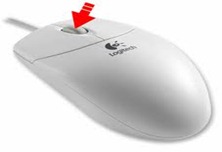 ột giữa (bánh xe di chuyển) để di chuyển lên xuống một trang. Tuy nhiên bánh xe này còn có thể làm được nhiều hơn thế. Cụ thể như:
 ột giữa (bánh xe di chuyển) để di chuyển lên xuống một trang. Tuy nhiên bánh xe này còn có thể làm được nhiều hơn thế. Cụ thể như:
- Bánh xe này có thể sử dụng như một nút. Khi ấn xuống bánh xe sẽ hoạt động như một nút chuột thứ 3. Điều này có thể sử dụng để mở một trang web trong một tab bằng các nhấn vào liên kết bất kỳ. Và cũng có thể dùng để đóng một tab bằng cách nhấn vào bánh xe trên bất kỳ tab nào đang mở.
- Nhanh chóng phóng to và thu nhỏ trên một trang web, tài liệu Word, Excel… Bằng cách giữ phím Ctrl và di chuyển bánh xe lên để phóng to và xuống để thu nhỏ.
- Di chuyển về phía trước và phía sau trong trình duyệt Internet bằng cách giữ phím Shift và di chuyển lên xuống. Di chuyển xuống để quay lại và di chuyển lên để về phía trước.
3. Chọn với 2 và 3 lần nhấp chuột (Select with double and triple click)

- Bất kỳ từ nào cũng dễ dang được lựa chọn bằng cách nhấp 2 lần liên tiếp vào từ đó (double-click).
- Để bôi đen một đoạn văn bản, nhấp 3 lần liên tiếp vào vị trí bất kỳ trên đoạn văn đó.
4. Sử dụng chuột phải (Use the right click)
- Nhấp chuột phải vào bất cứ lúc nào bạn muốn tô đen văn bản hoặc xem thuộc tính của đối tượng. Ví dụ: nếu bạn bôi đen một đoạn tập tin văn bản, bạn có thể click chuột phải chọn copy và chọn vị trí bất kỳ sau đó click chuột phải chọn paste để dán nó.
- Nếu bạn click chuột phải vào bất kỳ tập tin hay văn bản nào và kéo nó đi trong khi vẫn giữ nút bên phải, khi đó nó sẽ hiện lên một menu ngữ cảnh cho bạn chọn sao chép hay di chuyển tập tin hay đoạn văn bản. Điều này giúp bạn tiết kiệm thời gian hơn.

- Trong một trình duyệt, khi nhấn và giữ phím Ctrl trong khi click vào liên kết bất kỳ thì liên kết đó sẽ được mở trong một tab mới.
5. Phím Ctrl và click chuột hoặc tô sáng (Ctrl key and mouse click or highlight)
- Trong khi giữ phím Ctrl bạn có thể nhấp chuột trái để chọn nhiều đối tượng, hoặc đánh dẫu nhiều phần của văn bản. Ví dụ trong Windows bạn có thể giữ phím Ctrl và click các file để chọn nhiều File cùng một lúc. Nếu bạn muốn tô sáng các phần khác nhau của đoạn văn bản hoặc một trang Web, bạn cũng có thể giữ phím Ctrl và chọn từng phần muốn sao chép.
6. Sử dụng các nút chuột bên (Use the mouse side button)
- Nhiều chuột máy tính có thêm nút chuột bên. Các nút này có thể được lập trình để làm bất cứ điều gì, tuy nhiên, theo mặc định thì nút bên trái (sử dụng ngón cái để bấm) được sử dụng như nút back trên trình duyệt web. Điều này tỏ ra thú vị khi bạn muốn sử dụng tính năng back trên trình duyệt mà không cần phải di chuyển trỏ chuột tới nút đó để quay về trang trước..
7. Sử dụng tính năng Windows Snap (Use the Windows Snap to feature)
- Hãy tận dụng tính năng tự động di chuyển trỏ chuột tới các nút xuất hiện trong hộp thoại.

Ví dụ: Khi bạn xóa một tập tin máy tính sẽ hiện ra một hộp thoại thông báo để xác minh việc xóa file. Khi tính năng Windows Snap được kích hoạt, trỏ chuột sẽ tự động di chuyển đến nút yes, việc còn lại của bạn là chỉ bấm. Tính năng này giúp bạn tiết kiệm được thời gian phải di chuyển trỏ chuột.
- Để kích hoạt tính năng này bạn vào Control Panel –> Mouse –> Pointer Options trong mục Snap to đánh dấu vào ô Automatically move pointer to the default button in a dialog box.
- Bạn cũng có thể thiết lập tốc độ chuột, và một số tính năng khác trong hộp thoại này để nâng cao hiệu suất sử dụng chuột.
8. Quản lý các cửa sổ đang mở với chuột (Manage open windows with mouse)
- Click đôi vào thanh tiêu đề (title bar) để cực đại hóa cửa sổ, hoặc nếu cửa sổ đang cực đại thì nó thay đổi kích thước cửa sổ nhỏ hơn. Bạn cũng có thể nhấp đôi vào biểu tượng trên cùng của cửa sổ ở góc trái để đóng cửa sổ.
9. Sử dụng chuột phím (Move the mouse with your keyboard)
- Thay vì sử dụng chuột đi kèm với máy tính, bạn cũng có thể cho phép windows sử dụng các phím số như một con chuột.
- Click Start, Settings, Control Panel.
- Chọn Accessibility Options or Ease of Access
- Click Mouse tab.
- Đánh dấu vào ô “Use Mouse Keys” .
- Chọn Apply hoặc OK để áp dụng thiết lập này.
Sau khi kích hoạt bạn có thể sử dụng các phím qua –4, lại – 6, lên – 8, xuống – 2. Và phím số 5 như là chuột trái.
10. Tùy chỉnh chuột (Customize your mouse)
- Nếu bạn có một con chuột có hơn 2 nút bấm, cài đặt phần mềm kèm theo khi bạn mua con chuột đó sẽ giúp bạn tùy chỉnh chuột đó nhiều hơn. Ví dụ nếu bạn không sử dụng các nút phụ để di chuyển qua lại trong một trang web thì bạn có thể thay đổi nó cho một tính năng khác mà bạn hay sử dụng hơn


I am really loving the theme/design of your
Trả lờiXóasite. Do you ever run into any browser compatibility issues?
A couple of my blog readers have complained about my blog not working correctly in
Explorer but looks great in Firefox. Do you have any tips to help fix this issue?
Feel free to visit my web site: best quotes ever
Hello there, just became alert to your blog through Google, and
Trả lờiXóafound that it is truly informative. I am going to
watch out for brussels. I will be grateful if you continue
this in future. Numerous people will be benefited from your writing.
Cheers!
my web blog; self esteem quotes
Asking questions are genuinely good thing if you are not understanding
Trả lờiXóasomething fully, except this post provides fastidious
understanding even.
Look into my blog post - genghis khan quotes
What's Going down i'm new to this, I stumbled upon this I have discovered It positively useful and it
Trả lờiXóahas helped me out loads. I'm hoping to contribute & help different customers like its aided me. Great job.
Here is my homepage; rolling stones songs
Oh my goodness! Awesome article dude! Thanks, However I am having difficulties with your
Trả lờiXóaRSS. I don't understand why I cannot join it. Is there anybody else having similar RSS problems? Anyone who knows the answer will you kindly respond? Thanks!!
Here is my web-site :: friedrich nietzsche quotes
Hi, Neat post. There is a problem together with
Trả lờiXóayour website in web explorer, could test this?
IE nonetheless is the market leader and a large component of other people will leave out your wonderful writing because of this problem.
Also visit my web-site: struggle quotes
Wow that was odd. I just wrote an incredibly long comment but after I clicked submit my comment didn't appear. Grrrr... well I'm
Trả lờiXóanot writing all that over again. Anyways, just wanted to say superb blog!
My web blog; tired quotes
Hey! I just wanted to ask if you ever have any problems with hackers?
Trả lờiXóaMy last blog (wordpress) was hacked and I ended up losing many months of
hard work due to no data backup. Do you have any solutions to stop hackers?
Visit my web blog; depressing quotes
Thankfulness to my father who shared with me
Trả lờiXóaabout this website, this web site is actually awesome.
Here is my homepage - madea quotes
Its not my first time to go to see this web page, i
Trả lờiXóaam visiting this site dailly and obtain nice data from here daily.
My weblog: future quotes
Great delivery. Sound arguments. Keep up the great spirit.
Trả lờiXóaAlso visit my web blog - amazing quotes
I am genuinely thankful to the holder of this web page who has shared this wonderful post at here.
Trả lờiXóaAlso visit my page - teddy roosevelt quotes
Can you tell us more about this? I'd like to find out some additional information.
Trả lờiXóamy web page ... madea quotes
Excellent site you have here but I was wondering if you knew of any message boards that cover the same topics talked about in this article?
Trả lờiXóaI'd really like to be a part of online community where I can get opinions from other experienced people that share the same interest. If you have any recommendations, please let me know. Thanks a lot!
my website; future quotes
Thank you for the auspicious writeup. It in fact was a
Trả lờiXóaamusement account it. Look advanced to far added agreeable from
you! By the way, how can we communicate?
Also visit my web blog; brother and sister quotes
Hey very interesting blog!
Trả lờiXóamy website country flags
I'm really enjoying the design and layout of your blog. It's a
Trả lờiXóavery easy on the eyes which makes it much more pleasant for me to
come here and visit more often. Did you hire out a developer
to create your theme? Exceptional work!
Here is my site: douglas adams quotes
Hello are using Wordpress for your site platform? I'm new to the blog world but I'm trying to
Trả lờiXóaget started and create my own. Do you require any html coding
expertise to make your own blog? Any help would be really appreciated!
My blog post ... depressing quotes
Attractive section of content. I just stumbled upon your web site and
Trả lờiXóain accession capital to assert that I get in fact enjoyed account
your blog posts. Anyway I will be subscribing to your augment and even I achievement you access consistently fast.
Feel free to visit my web-site - frank ocean quotes
I’m not that much of a online reader to be honest but your blogs really
Trả lờiXóanice, keep it up! I'll go ahead and bookmark your site to come back later on. Many thanks
Here is my site ... feelings quotes
Heya i am for the primary time here. I found this board and I in finding It truly useful & it helped me out a lot.
Trả lờiXóaI'm hoping to present something back and aid others like you helped me.
My web blog - frank ocean quotes
I’m not that much of a internet reader to be honest but your blogs really nice, keep it up!
Trả lờiXóaI'll go ahead and bookmark your website to come back down the road. Many thanks
Also visit my web blog; genghis khan quotes
Terrific article! That is the kind of info that are meant to be shared around the net.
Trả lờiXóaShame on the seek engines for not positioning this post higher!
Come on over and seek advice from my website . Thank you =)
Feel free to surf to my web-site :: commitment quotes
I'm now not sure the place you are getting your information, however great topic. I needs to spend a while finding out much more or figuring out more. Thanks for great info I was on the lookout for this information for my mission.
Trả lờiXóamy web blog unusual animals
Hello my friend! I wish to say that this post is amazing, nice written
Trả lờiXóaand come with almost all significant infos.
I'd like to look more posts like this .
Check out my web site country flags
Hello there! I could have sworn I've been to this site before but after browsing through some of the post I realized it's
Trả lờiXóanew to me. Anyhow, I'm definitely glad I found it and I'll be
bookmarking and checking back frequently!
Feel free to surf to my weblog; sylvia plath quotes
Good day! Do you know if they make any plugins to help with SEO?
Trả lờiXóaI'm trying to get my blog to rank for some targeted keywords but I'm not seeing very good success.
If you know of any please share. Appreciate it!
my web site girlfriend quotes
My spouse and I stumbled over here by a different website and thought I should check things out.
Trả lờiXóaI like what I see so i am just following you.
Look forward to looking into your web page again.
my web page :: self esteem quotes
Can I just say what a relief to find someone that really knows what they're discussing over the internet. You actually know how to bring a problem to light and make it important. More people ought to check this out and understand this side of your story. I was surprised you're not more popular because you
Trả lờiXóacertainly possess the gift.
my weblog commitment quotes
Hi, Neat post. There is a problem with your website in web explorer,
Trả lờiXóacould test this? IE nonetheless is the market leader and
a large portion of other people will omit your wonderful writing due to this problem.
Also visit my blog ... struggle quotes
That is really interesting, You are an excessively professional blogger.
Trả lờiXóaI have joined your feed and look forward to searching
for more of your excellent post. Also, I've shared your site in my social networks
Here is my web site: nora ephron quotes
My relatives every time say that I am killing my time here at net, however I know I am getting experience every day by reading thes good articles or reviews.
Trả lờiXóaStop by my webpage; letting go quotes
Excellent, what a webpage it is! This webpage provides useful data to us, keep it up.
Trả lờiXóaFeel free to visit my web-site hatred quotes
Great goods from you, man. I've take into account your stuff prior to and you are just extremely fantastic. I really like what you've bought here, certainly like what you are stating and the
Trả lờiXóabest way by which you say it. You're making it entertaining and you continue to care for to stay it smart. I can't wait to learn far more
from you. That is really a tremendous website.
my web-site ... letting go quotes
When I originally commented I clicked the "Notify me when new comments are added" checkbox and now
Trả lờiXóaeach time a comment is added I get several e-mails with the same
comment. Is there any way you can remove people from that service?
Many thanks!
My web page john locke quotes
Hi there i am kavin, its my first time to commenting anywhere, when i read this post i
Trả lờiXóathought i could also make comment due to this brilliant article.
My web-site; zayn malik quotes
Hi, I wish for to subscribe for this web site to obtain latest updates, therefore where can i do it
Trả lờiXóaplease help.
My web page: kahlil gibran quotes
It's remarkable to pay a quick visit this web page and reading the views of all friends about this post, while I am also keen of getting knowledge.
Trả lờiXóaHere is my webpage; rolling stones songs
Wow, fantastic blog layout! How long have you been blogging for?
Trả lờiXóayou made blogging look easy. The overall look of your site is magnificent, let alone the content!
Also visit my blog post :: william shakespeare quotes